
Photometric determination of ammonium in soil using indophenol blue method after extraction with calcium chloride solution
Introduction
Ammonium (NH4+) is one of the most important sources of nitrogen for plant nutrition and it is formed with the mineralization of decomposed organic matter.1 Research also has established that ammonium is the naturally preferred source of nitrogen for plant growth.2 With the increasing global demand for organic food products, farmers are resorting to the use of compost and manure. While ready-made ammonium fertilizers have defined concentrations of the cation and related compounds in them, it is important to analyze composts and manure for their accurate ammonium concentration. As the early phases of decomposition account for the loss of nitrogen as ammonia, and there is a natural loss of ammonium as the compost matures.3 Excess ammonium has also been reported to be toxic in higher plants.4
Experimental
This application note details the photometric determination of ammonium in soils, using the indophenol blue method, after its extraction with calcium chloride solution.
Method
Ammonium nitrogen (NH4-N) occurs partly in the form of ammonium ions and partly as ammonia. A pH-dependent equilibrium exists between the two forms.
In strongly alkaline solution ammonium nitrogen is present almost entirely as ammonia, which reacts with a chlorinating agent to form monochloramine. This in turn reacts with a substituted phenol to form a blue indophenol derivative that is determined photometrically. Due to the intrinsic yellow coloration of the reagent blank, the measurement solution is yellow-green to green in color.
The method is analogous to EPA 350.1, APHA 4500-NH3 F, ISO 7150-1, and DIN 38406-5.
Measuring range
Reagents, instruments, and materials
Ammonium test kit/reagents
For the measurement one of the following Spectroquant® test kits is necessary:
- Spectroquant® Ammonium Cell Test (1.14739)
- Spectroquant® Ammonium Cell Test (1.14558)
- Spectroquant® Ammonium Cell Test (1.14544)*
- Spectroquant® Ammonium Cell Test (1.14559)
- Spectroquant® Ammonium Test (1.14752)
- Spectroquant® Ammonium Test (1.00683)
*not compatible with Move 100
Instrument(s) and devices
For the measurement one of the following Spectroquant® photometers is necessary:
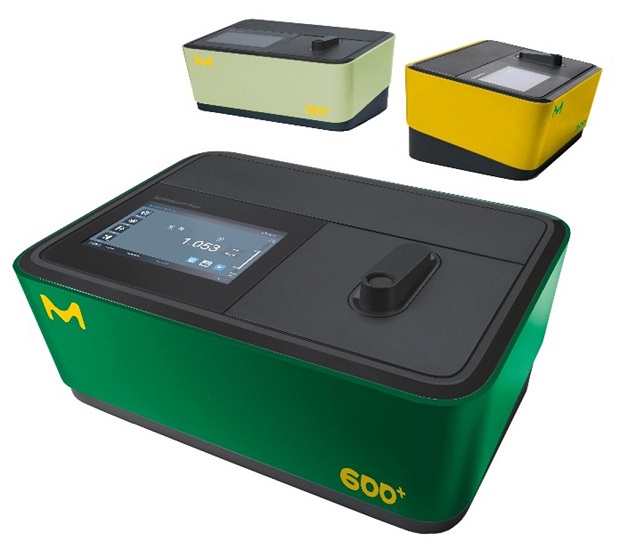
- Spectroquant® VIS Spectrophotometer Prove 100 plus (1.73026)
- Spectroquant® UV/VIS Spectrophotometer Prove 300 plus (1.73027)
- Spectroquant® UV/VIS Spectrophotometer Prove 600 plus (1.73028)
- Spectroquant® Colorimeter Move 100 (1.73632)
Note: Also, legacy Spectroquant® instruments are suitable.
Software for data transfer
Optional Spectroquant® Prove Connect to LIMS software package (Y.11086) to transfer your data into an existing LIMS system.
Instrument accessories
- Rectangular cell 10 mm (1.14946)
- Rectangular cells 20 mm (1.14947)
- Rectangular cells 50 mm (1.14944)
Other reagents and accessories
- Calcium chloride dihydrate for analysis (1.02382)
- Water for analysis (1.16754)
- Charcoal activated for soil test
- Analytical balance
- Standard laboratory glassware (e.g., glass beakers) and pipettes
- Spatula
- Stirring plate or shaker
- Drying kiln
- Folded filter
Analytical procedure
Reagent preparation
Calcium chloride solution 0.025 mol/L: Dissolve 3.68 g calcium chloride dihydrate for analysis with 1 L of water for analysis.
Sample preparation
- In a glass bottle mix 50 g of naturally moist sample, free from coarse stones, with 100 mL of the calcium chloride solution 0.025 mol/L.
- Add a spatula-tip full of charcoal activated for soil tests and shake the closed bottle in a shaking machine for 1 hour (alternative stir in a beaker).
- Let the suspension settle and filter it through a folded filter.
- For determination of the water content dry a similar sample to constant weight in the drying kiln at 105 °C.
Note: A drying of the sample before determination is not advisable because of the fast change in the nitrogen forms. The analysis should take place very quickly. Storing the sample in plastic bags at room temperature changes the analysis values after a short time already.
Using cat. no. 1.14739: procedure and measurement
For more information on the measurement, see the packaging insert of the test.
Procedure
- Pipette 5.0 mL Pretreated sample into a reaction cell, close the cell, and mix.
- Add 1 dose Reagent NH4-1K, close the cell tightly, and shake vigorously until the reagent is completely dissolved.
- Leave to stand for 15 min (reaction time), then measure the sample in the photometer.
Note: White crystals may be present in the reaction cells. However, these dissolve when the sample is added and do not influence the measurement result.
Measurement
- For photometric measurement the cells must be clean. Wipe, if necessary, with a clean dry cloth.
- Measurement of turbid solutions yields false-high readings.
- Ammonium-free samples turn yellow on addition of reagent NH4-1K.
- The pH of the measurement solution must be within the range 11.5 - 11.8.
- The color of the measurement solution remains stable for at least 60 min after the end of the reaction time stated above.
- In the event of ammonium concentrations exceeding 100 mg/L, other reaction products are formed, and false-low readings are yielded. In such cases it is advisable to conduct a plausibility check of the measurement results by diluting the sample (1:10, 1:100).
Hints for measurement
- It is recommended to zero the method each new working day. To do this, open the method, either by manually selecting the method or by inserting a barcoded cell. Tap the <Settings> button and select the <ZERO ADJUSTMENT> menu item. After prompting, insert the 16 mm zero cell through the corresponding opening. The zero adjustment is performed automatically. Confirm the performance of the zero-adjustment procedure by clicking on <OK>.
- After the zero has been performed, insert the barcoded Spectroquant® round cell through the corresponding opening, ensuring that the white position mark on the cell is aligned with the positioning mark on the spectrophotometer. The measurement starts automatically.
- Read off the result in mg/L from the display.
Hint: The above written measurement description is only valid for the Spectroquant® Prove (plus) series photometer. If a different instrument is used, please consult the corresponding instrument manual for more details on how to perform the measurement.
Using cat. no. 1.14558: procedure and measurement
For more information on the measurement, see the packaging insert of the test.
Procedure
- Pipette 1.0 mL Pretreated sample into a reaction cell, close the cell, and mix.
- Reagent NH4-1K 1 dose Add, close the cell tightly, and shake vigorously until the reagent is completely dissolved.
- Leave to stand for 15 min (reaction time), then measure the sample in the photometer.
Measurement
- For photometric measurement the cells must be clean. Wipe, if necessary, with a clean dry cloth.
- Measurement of turbid solutions yields false-high readings.
- Ammonium-free samples turn yellow on addition of reagent NH4-1K.
- The pH of the measurement solution must be within the range 11.5 - 11.8.
- The color of the measurement solution remains stable for at least 60 min after the end of the reaction time stated above.
- In the event of ammonium concentrations exceeding 500 mg/L, other reaction products are formed, and false-low readings are yielded. In such cases it is advisable to conduct a plausibility check of the measurement results by diluting the sample (1:10, 1:100).
Hints for measurement
- It is recommended to zero the method each new working day. To do this, open the method, either by manually selecting the method or by inserting a barcoded cell. Tap the <Settings> button and select the <ZERO ADJUSTMENT> menu item. After prompting, insert the 16 mm zero cell through the corresponding opening. The zero adjustment is performed automatically. Confirm the performance of the zero-adjustment procedure by clicking on <OK>.
- After the zero has been performed, insert the barcoded Spectroquant® round cell through the corresponding opening, ensuring that the white position mark on the cell is aligned with the positioning mark on the spectrophotometer. The measurement starts automatically.
- Read off the result in mg/L from the display.
Hint: The above written measurement description is only valid for the Spectroquant® Prove (plus) series photometer. If a different instrument is used, please consult the corresponding instrument manual for more details on how to perform the measurement.
Using cat. no. 1.14544: procedure and measurement
For more information on the measurement, see the packaging insert of the test.
Procedure
- Pipette 0.50 mL Pretreated sample into a reaction cell, close the cell, and mix.
- Add 1 dose Reagent NH4-1K, close the cell tightly, and shake vigorously until the reagent is completely dissolved.
- Leave to stand for 15 min (reaction time), then measure the sample in the photometer.
Measurement
- For photometric measurement the cells must be clean. Wipe, if necessary, with a clean dry cloth.
- Measurement of turbid solutions yields false-high readings.
- Ammonium-free samples turn yellow on addition of reagent NH4-1K.
- The pH of the measurement solution must be within the range 11.5 - 11.8.
- The color of the measurement solution remains stable for at least 60 min after the end of the reaction time stated above.
- In the event of ammonium concentrations exceeding 1000 mg/L, other reaction products are formed, and false-low readings are yielded. In such cases it is advisable to conduct a plausibility check of the measurement results by diluting the sample (1:10, 1:100).
Hints for measurement
- It is recommended to zero the method each new working day. To do this, open the method, either by manually selecting the method or by inserting a barcoded cell. Tap the <Settings> button and select the <ZERO ADJUSTMENT> menu item. After prompting, insert the 16 mm zero cell through the corresponding opening. The zero adjustment is performed automatically. Confirm the performance of the zero-adjustment procedure by clicking on <OK>.
- After the zero has been performed, insert the barcoded Spectroquant® round cell through the corresponding opening, ensuring that the white position mark on the cell is aligned with the positioning mark on the spectrophotometer. The measurement starts automatically.
- Read off the result in mg/L from the display.
Hint: The above written measurement description is only valid for the Spectroquant® Prove (plus) series photometer. If a different instrument is used, please consult the corresponding instrument manual for more details on how to perform the measurement.
Using cat. no. 1.14559: procedure and measurement
For more information on the measurement, see the packaging insert of the test.
Procedure
- Pipette 0.10 mL Pretreated sample into a reaction cell, close the cell, and mix.
- Add 1 dose Reagent NH4-1K, close the cell tightly, and shake vigorously until the reagent is completely dissolved.
- Leave to stand for 15 min (reaction time), then measure the sample in the photometer.
Measurement
- For photometric measurement the cells must be clean. Wipe, if necessary, with a clean dry cloth.
- Measurement of turbid solutions yields false-high readings.
- Ammonium-free samples turn yellow on addition of reagent NH4-1K.
- The pH of the measurement solution must be within the range 11.5 - 11.8.
- The color of the measurement solution remains stable for at least 60 min after the end of the reaction time stated above.
- In the event of ammonium concentrations exceeding 5000 mg/L, other reaction products are formed, and false-low readings are yielded. In such cases it is advisable to conduct a plausibility check of the measurement results by diluting the sample (1:10, 1:100).
Hints for measurement
- It is recommended to zero the method each new working day. To do this, open the method, either by manually selecting the method or by inserting a barcoded cell. Tap the <Settings> button and select the <ZERO ADJUSTMENT> menu item. After prompting, insert the 16 mm zero cell through the corresponding opening. The zero adjustment is performed automatically. Confirm the performance of the zero-adjustment procedure by clicking on <OK>.
- After the zero has been performed, insert the barcoded Spectroquant® round cell through the corresponding opening, ensuring that the white position mark on the cell is aligned with the positioning mark on the spectrophotometer. The measurement starts automatically.
- Read off the result in mg/L from the display.
Hint: The above written measurement description is only valid for the Spectroquant® Prove (plus) series photometer. If a different instrument is used, please consult the corresponding instrument manual for more details on how to perform the measurement.
Using cat. no. 1.14752: procedure and measurement
For more information on the measurement, see the packaging insert of the test.
Procedure
- Add 0.60 mL Reagent NH4-1 with pipette and mix.
- Add 1 level blue microspoon (in the cap of the bottle) NH4-2 Reagent NH4-2 and shake vigorously until the reagent is completely dissolved. Leave to stand for 5 min (reaction time A).
- Add 4 drops Reagent NH4-3 and mix. Hold the bottle vertically while adding the reagent!
- Leave to stand for 5 min (reaction time B), then fill the sample into the cell, and measure in the photometer.
Notes:
- For measurement in the 50-mm cell both the sample volume as well as the quantities of reagents NH4-1, NH4-2, and NH4-3 must be doubled. Alternatively, the semi-microcell Cat. No. 1.73502 can be used.
- When using the 50-mm cell is recommended to measure against an own prepared blank sample (preparation as per measurement sample, but with distilled water instead of sample) to increase the accuracy. Configure the photometer for blank measurement.
Measurement
- Certain photometers may require a blank (preparation as per measurement sample, but with distilled water instead of sample).
- For photometric measurement the cells must be clean. Wipe, if necessary, with a clean dry cloth.
- Measurement of turbid solutions yields false-high readings.
- Ammonium-free samples turn yellow on addition of reagent NH4-3.
- The pH of the measurement solution must be approx. 12.5.
- The color of the measurement solution remains stable for at least 60 min after the end of the reaction time B stated above.
- In the event of ammonium concentrations exceeding 100 mg/L, other reaction products are formed, and false-low readings are yielded. In such cases it is advisable to conduct a plausibility check of the measurement results by diluting the sample (1:10, 1:100).
Hints for measurement
- It is recommended to zero the method for each new working day. To do this, open the method by inserting the barcode, tap the <Settings> button and select the <ZERO ADJUSTMENT> menu item. Fill the same cell which will be used for the sample measurement with distilled water. After prompting, insert the filled rectangular cell into the cell compartment. The zero adjustment is performed automatically. Confirm the performance of the zero-adjustment procedure by clicking on <OK>.
- After the zero adjustment, fill the measurement sample into the same or a matched rectangular cell and insert the cell into the cell compartment. The measurement starts automatically.
- Read off the result in mg/L from the display.
Hint: The above written measurement description is only valid for the Spectroquant® Prove (plus) series photometer. If a different instrument is used, please consult the corresponding instrument manual for more details on how to perform the measurement.
Using cat. no. 1.00683: procedure and measurement
For more information on the measurement, see the packaging insert of the test.
Procedure measuring range 2.6 - 96.6 mg/L NH4+:
- Pipette 5,0 mL Reagent NH4-1 into a test tube.
- Add 0.20 mL Pretreated sample with pipette and mix.
- Add 1 level blue microspoon (in the cap of the NH4-2 bottle) Reagent NH4-2 and shake vigorously until the reagent is completely dissolved.
- Leave to stand for 15 min (reaction time), then fill the sample into a 10-mm cell, and measure in the photometer.
Procedure measuring range 6 - 193 mg/L NH4+:
- Pipette 5,0 mL Reagent NH4-1 into a test tube.
- Add 0.10 mL Pretreated sample with pipette and mix.
- Add 1 level blue microspoon (in the cap of the NH4-2 bottle) Reagent NH4-2 and shake vigorously until the reagent is completely dissolved.
- Leave to stand for 15 min (reaction time), then fill the sample into a 10-mm cell, and measure in the photometer.
Measurement
- Due to the strong temperature dependence of the color reaction, the temperature of the reagents should be between 20 and 30 °C.
- Certain photometers may require a blank (preparation as per measurement sample, but with distilled water instead of sample).
- For photometric measurement the cells must be clean. Wipe, if necessary, with a clean dry cloth.
- Measurement of turbid solutions yields false-high readings.
- Ammonium-free samples turn yellow on addition of reagent NH4-2.
- The pH of the measurement solution must be within the range 11.5 - 11.8.
- The color of the measurement solution remains stable for at least 60 min after the end of the reaction time stated above.
- In the event of ammonium concentrations exceeding 2500 mg/l, other reaction products are formed, and false-low readings are yielded. In such cases it is advisable to conduct a plausibility check of the measurement results by diluting the sample (1:10, 1:100).
Hints for measurement
- It is recommended to zero the method for each new working day. To do this, open the method by inserting the barcode, tap the <Settings> button and select the <ZERO ADJUSTMENT> menu item. Fill the same cell which will be used for the sample measurement with distilled water. After prompting, insert the filled rectangular cell into the cell compartment. The zero adjustment is performed automatically. Confirm the performance of the zero-adjustment procedure by clicking on <OK>.
- After the zero adjustment, fill the measurement sample into the same or a matched rectangular cell and insert the cell into the cell compartment. The measurement starts automatically.
- Read off the result in mg/L from the display.
Hint: The above written measurement description is only valid for the Spectroquant® Prove (plus) series photometer. If a different instrument is used, please consult the corresponding instrument manual for more details on how to perform the measurement.
Analytical quality assurance
Analytical quality assurance (AQA) is recommended before each measurement series.
To check the photometric measurement system (test reagent, measurement device, handling) and the mode of working, Spectroquant® ammonium standard solutions or CombiChecks (see section 5 of the respective test kit instruction) can be used. Besides a standard solution, CombiChecks also contains an addition solution for determining sample-dependent interferences (matrix effects).
Sample-dependent interferences (matrix effects) can be determined by means of standard addition or dilution.
To view additional notes, visit SigmaAldrich.com/qa-test-kits.
Calculation
Ammonium content in mg/kg NH4+ = analysis value in mg/L NH4+ x 2
*Product 1.14544 is not compatible with Move 100.